Comic Book Studio
- 4.0
- Rating
- 10.00K
- Installs
- Free
- Price

 Analysis by App-foxy
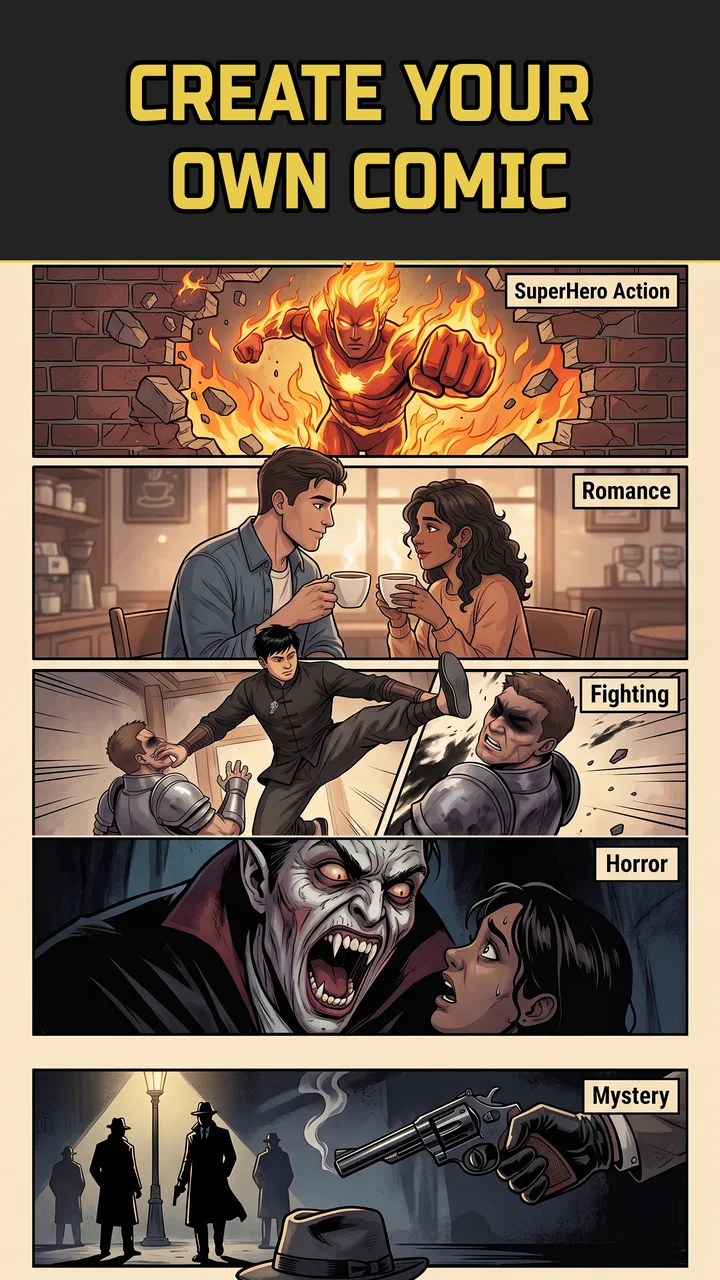
I approached Comic Book Studio as a practical comics app rather than as a replacement for a full drawing suite. Its purpose is clear: help you turn an idea into manga, manhwa, or webtoon-style material with an AI comic generator. That makes it interesting for quick visual storytelling, concept work, and anyone who wants to explore comic-making without first learning every tool in a professional illustration program.
My overall impression is mixed in a useful way. The app lowers the barrier to starting a comic, but that convenience does not automatically mean it will deliver a polished, consistent book without supervision. I found the strongest value in using it as an idea-development tool: a way to test a scene, shape a short sequence, or discover a visual direction. I would be more cautious about treating it as a complete production pipeline.
It is a free comics app from EVL Apps, with optional in-app purchases ranging from a small amount to considerably more for individual items. The audience rating is Everyone, and the app is available for Android devices running version 7.0 or later. That broad compatibility makes it approachable, although the creative experience will still depend heavily on the phone or tablet being used.
You May Also Like

 Blood Strike: 2.5 Anniversary
Blood Strike’s Loadouts Turn Every Drop Into a Tactical Gamble
A close look at Blood Strike’s custom loadouts: how fast access to signature weapons reshapes its battle royale rhythm, rewards preparation, and narrows the gap between fights.

 Pandora - Music & Podcasts
Pandora’s Music Is Easy to Start, but Harder to Recover
Pandora’s strength is its low-effort path from a seed to a station. Its weak spot is how much confidence it asks you to place in connection, setup, and quiet recovery.

 8 Ball Pool
8 Ball Pool Is Built on Rivalries, Rematches, and Routine
A close look at the rivalries, rematches, shared routines, and unanswered safety questions that turn a quick pool match into a persistent mobile community.

 Samsung Music
Samsung Music’s Quiet Strength Is Playing What You Already Own
Its reach comes less from spectacle than from dependable access to a personal library. That simplicity is both the app’s strongest retention engine and its ceiling.

 AccuWeather: Weather Radar
AccuWeather Review: A Quick, Clear Forecast for Everyday Decisions
For everyday plans, the best forecast is the one you can understand quickly. AccuWeather makes rain timing, radar, and local conditions easy to act on, with a few trade-offs.

 Hill Climb Racing
Why Hill Climb Racing Still Turns Crashes Into One More Run
A tiny car, a bumpy hill and one more upgrade: Hill Climb Racing keeps resurfacing because its simple chaos makes every near-miss feel personal.
More From Our News Desk



What it feels like to create with Comic Book Studio
I find the appeal of creating with Comic Book Studio is less about getting a finished page instantly and more about having something concrete to react to. I’d start with a small scene, then judge each image by whether it helps the story read clearly—not just whether it looks striking. That first pass also makes it easier to decide which settings and habits are worth carrying into a longer project.
A quick route from idea to comic page
The most appealing part of this app is the short distance between a vague idea and something that looks like a comic concept. With a conventional drawing app, I would normally need to choose a canvas, sketch characters, build a background, arrange panels, add text, and then adjust the composition. An AI-focused comic tool changes that rhythm. Instead of beginning with a blank page, I can begin with a scene or a visual prompt and refine the result from there.
That workflow is especially useful when I am not trying to make a definitive final illustration. Suppose I have an idea for a short webtoon about a courier who delivers packages to abandoned buildings. I can use the app to explore the mood of the opening scene, test whether a vertical composition suits the story, and think about how much dialogue the panel can hold. Even an imperfect result can help me make decisions that would otherwise remain abstract.
The important distinction is that AI generation is good at starting conversations with the image, not necessarily ending them. I would expect to spend time correcting awkward details, choosing the most useful output, and making sure the sequence still makes sense from panel to panel. Readers who want a one-tap finished comic may find that expectation frustrating.
Where the manga and webtoon focus matters
Comic Book Studio is more specific than a general image generator because its appeal is tied to sequential storytelling. A single attractive picture is not enough for a comic. Characters need to remain recognizable, action needs to read from one panel to the next, and the layout needs to guide the eye. The app’s value therefore depends on how well it helps me think in scenes rather than isolated images.
For manga-inspired work, I would use it to explore expressions, dramatic framing, and moments that benefit from strong visual emphasis. For manhwa or webtoon ideas, I would think vertically and plan the scroll: a quiet setup near the top, a pause before a reveal, and enough space for the important beat to land. That planning step is easy to overlook, but it can make the difference between a sequence that feels readable and one that feels like unrelated pictures stacked together.
A useful habit is to describe the purpose of each panel before worrying about its appearance. I might label one panel “establish location,” another “show the character noticing the sound,” and a third “reveal what caused it.” This keeps the AI output in service of the story. Without that discipline, it is easy to collect attractive images that do not actually form a narrative.
Useful for planning, less convincing as a final studio
I see the app working best for beginners, hobby writers, visual storytellers, and artists who want a fast way to test ideas. It can also help someone who has written a scene but struggles to imagine the pacing. A rough visual sequence can expose problems in a script: an action may need more panels, a line of dialogue may be too long, or a supposedly important reveal may not have enough visual space.
On the other hand, I would not choose it as my only tool for a long-running series where character continuity, precise lettering, layered editing, and repeatable art direction are essential. A traditional drawing application gives me more direct control. A dedicated comic-layout program is usually better when panel borders, balloons, guides, and page dimensions matter more than rapid generation. A general AI image service may offer broader image experimentation, while Comic Book Studio has the advantage of being aimed at comic-making rather than at standalone pictures.
That comparison is not a dismissal. The app’s narrower purpose is also its reason to exist. If I want to move quickly from a story idea to a comic-like draft, a full illustration suite can feel unnecessarily heavy. If I need exact control over every line and recurring character, the convenience of generation becomes less important.
Three workflows that make the app more practical
My first recommended workflow is the thumbnail pass. I would create rough versions of several scenes before polishing any one of them. The goal is not beauty; it is checking whether the story reads in order. This saves time because a visually impressive first panel is not very useful if the second panel reverses the character’s position or makes the action unclear.
The second is the character reference habit. I would keep a short written description for each recurring character and reuse the same core wording whenever possible. Include the visible traits that matter to the story, such as hairstyle, clothing silhouette, or a distinctive accessory. This cannot guarantee perfect continuity, but it gives the process a stable starting point and makes inconsistent results easier to spot.
The third is to separate visual generation from lettering. I would first decide whether the panel communicates the action without text, then add only the dialogue that is genuinely needed. Long sentences can overwhelm a small panel, and text added too early may force the image to serve the words instead of the other way around. For a webtoon-style sequence, this is particularly important because the reader’s eye moves through a vertical rhythm rather than across a traditional page.
Trust, permissions, and the moments that deserve care
When I review an AI creative app, I do not treat its artistic promise as proof that it is trustworthy. I look for visible choices around access, accounts, purchases, and the handling of anything I submit. With Comic Book Studio, I would make those checks directly on the device before committing to a serious project. The app’s broad age rating makes it accessible, but an Everyone label should not be confused with a guarantee that every generated result will suit every family or classroom situation.
My cautious approach is simple: I would avoid entering private names, personal stories, confidential client material, or identifiable photographs unless I had first reviewed the app’s current permission prompts and privacy information. A comic idea may feel harmless, yet it can contain unpublished work, real people, or details that I would not want reused outside my control. This is especially relevant for writers and freelancers testing commercial concepts.
I would also pay close attention to the exact moment an optional purchase appears. The app is free to install, but individual in-app items can cost from $0.19 to $79.99. That spread is wide enough that I would not tap through a purchase screen casually. I would check what the item provides, whether it is consumable or reusable, and whether the result is important to the workflow before paying. A low-cost experiment is one thing; building a project around a paid resource without understanding its value is another.
For younger users, I would keep purchase controls protected through the device’s family settings. The age rating is Everyone, but creative apps can still encourage repeated experimentation, and repeated small purchases can become significant. I prefer to decide in advance whether the app is being used only with its free options or with a fixed spending limit.
Account control and personal agency
Before I invest hours in a project, I want to understand how much control I have over the work. I would check whether I can save drafts in a way that remains available to me, whether I can export finished pages, and whether deleting the app affects access to anything stored inside it. Those are practical questions, not technical trivia. A comic is a sequence of decisions, and losing the ability to retrieve or move that work can undermine the usefulness of the entire tool.
I would also look for clear controls around signing in, changing an account, and removing information. If the app asks me to create an account, I want to know what benefit that provides before sharing an email address. If it works without one, I would prefer to begin there while testing the workflow. That lets me judge the creative experience without immediately tying a small experiment to more personal information.
Another point of agency is deciding what the AI should and should not do. I would keep the story, character motivations, dialogue, and final selection under my control. The generator can suggest a visual direction, but it should not quietly become the author of the project. This matters most when the comic is intended for publication, schoolwork, or a client. I would retain the original script and my own notes so that the generated images remain part of a documented creative process rather than the only record of the work.
A realistic everyday use case
Imagine I have thirty minutes during a commute or a lunch break to develop a short comic idea. I would start with a three-panel scene rather than a whole chapter. The first panel establishes the setting, the second introduces a visual problem, and the third provides a small twist. I would generate several directions, discard the versions that lose the story, and keep the one whose composition best supports the sequence.
Afterward, I would write down what needs correction instead of trying to fix everything at once. Perhaps the character’s clothing changes, the background is too busy, or the final panel does not make the twist obvious. That list becomes a useful brief for later editing in another tool. In this scenario, Comic Book Studio saves me from staring at an empty canvas, but it does not pretend that the first pass is the finished comic.
For a student, the same process could help visualize a scene from an original script. For a writer, it could test pacing before commissioning artwork. For a hobbyist, it could turn a joke or dream sequence into a shareable draft. The common thread is that the app is most valuable when the user brings a clear purpose and evaluates the output critically.
Performance expectations and practical friction
AI image creation can be demanding, so I would test the app on the device I actually plan to use rather than assuming that minimum operating-system compatibility means identical performance everywhere. A newer phone may feel comfortable for experimentation, while an older compatible device may make repeated generation less pleasant. Storage is another practical consideration when saving multiple drafts or exporting images.
I would also keep a lightweight project system outside the app. A note with the story outline, panel order, character descriptions, and preferred results can prevent confusion when experimenting. This is one of the less obvious trade-offs of fast generation: the easier it is to create alternatives, the easier it is to lose track of which version actually belongs in the story.
Version 1.6.5 indicates that the app is being maintained through numbered releases, but I would still check the behavior after updates before opening an important project. Creative tools can change their interface or generation flow, and a workflow that feels familiar today may require adjustment later. I would keep exported copies of anything I consider important instead of relying on a single in-app draft.
Who should try it, and who should look elsewhere?
I would recommend Comic Book Studio to someone who wants a friendly entry point into comic concepts, especially if the blank canvas is the main obstacle. It is a sensible choice for exploring manga, manhwa, and webtoon ideas, creating rough storyboards, or producing visual prompts for a larger project. The free starting point makes it easier to test whether the approach suits you before spending money.
I would be more hesitant to recommend it to a professional illustrator who needs exact brush control, editable layers, or reliable character continuity across a long series. I would also steer away from it for anyone who wants a completely private workspace for sensitive material until they have personally reviewed the app’s current permission and account screens. People who dislike iterative AI output may be happier with a conventional drawing or layout app from the beginning.
The audience response gives me a modest confidence signal rather than a decisive one. The app has a 3.9 average from around 167 ratings, with about 26 written reviews, and it has passed 10K+ installs. That suggests a real but still relatively small user base. I would treat it as an app worth testing for a specific need, not as a mature standard that automatically replaces established comic software.
My cautious verdict
Comic Book Studio succeeds when I use it as a fast visual thinking partner. It helps me move from a written idea to a comic-shaped draft, and its focus on manga, manhwa, and webtoons gives the experimentation a clearer direction than a generic image tool. The best results come from planning short sequences, maintaining character notes, and judging every panel for story clarity rather than accepting the first attractive image.
Its limitations are equally important. AI generation does not remove the need for editing, continuity checks, lettering decisions, or backups. The wide range of optional purchase prices means I would examine each transaction carefully, and I would avoid sensitive material until I had reviewed the app’s visible choices about permissions, accounts, and data. Those precautions do not make the app unusable; they make the experience more deliberate.
My recommendation is to try it as a low-commitment comic ideation tool, while keeping final creative control and important project files elsewhere. If you want a quick way to discover how a scene might look, it is worth exploring. If you need a fully controlled studio for a finished graphic novel, I would choose a dedicated drawing and comic-layout workflow instead.
FAQs for Comic Book Studio
01What is Comic Book Studio, and what can you create with it?
Comic Book Studio is a creative app designed for making digital comics, visual stories, and illustrated scenes. After exploring its tools, I found that it is useful for combining characters, backgrounds, speech bubbles, captions, and panels into a structured comic layout. It can suit beginners who want a simple storytelling tool as well as more experienced creators planning pages for personal projects, social media, or presentations.
02Is Comic Book Studio easy to use for beginners?
The app is generally approachable for beginners because comic creation is organized around visual editing rather than complicated professional design software. New users can experiment with layouts, add artwork, position dialogue, and adjust page elements without needing advanced drawing knowledge. However, creating polished pages still requires patience, especially when arranging multiple panels, aligning objects, choosing readable text, and maintaining a consistent style throughout a complete story.
03Does Comic Book Studio require drawing skills or provide ready-made assets?
You do not necessarily need strong drawing skills to start using Comic Book Studio. The app is intended to help users build comics with available visual elements, templates, characters, backgrounds, and text tools, depending on the version and platform. These resources make it possible to produce a basic story quickly. Users who want completely original artwork may still need to import their own images or use another drawing application.
04Can comics made in Comic Book Studio be saved or shared with other people?
Comic Book Studio is designed for creating finished comic pages that can be saved for later editing and shared when your project is ready. The exact export options may depend on the device, app version, and available features, so it is worth checking the current store listing before downloading. Before sharing publicly, review image quality, page order, text readability, and whether any included assets have usage restrictions.
05Is Comic Book Studio free, and are there in-app purchases or limitations?
The download and basic comic-making features may be available without an upfront payment, but users should check the current Android or iOS listing for the latest pricing details. Some versions of creative apps limit premium templates, assets, export formats, or advanced tools behind in-app purchases. I recommend reviewing subscriptions, one-time payments, advertisements, and cancellation terms before starting a larger project inside the application.
Pros
- Simple tools make comic creation approachable for beginners.
- Supports custom characters
- backgrounds
- props
- and speech bubbles.
- Useful for planning scenes without needing drawing skills.
- Quick export makes sharing finished comic pages convenient.
- Works well for short stories
- jokes
- and classroom projects.
Cons
- Advanced artists may find the drawing and editing tools limited.
- Some assets or features may require in-app purchases.
- Large projects can become difficult to organize across many panels.
- Export options may not offer enough control for professional printing.
- Creating detailed comics can feel repetitive with preset-based assets.

Comic Book Studio
Gallery